

Best ELD Features Trucking Companies Should Look For Before Buying
Every electronic logging device on the market claims to keep a fleet compliant, but the systems that actually work well in daily use share a specific set of characteristics. Understanding the best ELD features to look for means separating what FMCSA technical standards require from what simply makes a system easier to run day to day. There isn’t one universal system that fits every fleet. The right choice depends on your vehicles, your drivers, and how your operation actually runs. This guide walks through what to evaluate before buying, so the decision is based on fit rather than marketing claims.
This article provides general information for educational purposes. It is not legal advice, and specific compliance questions should be confirmed with FMCSA or a qualified compliance professional.
Why Choosing the Right ELD System Matters
The system you choose affects more than whether logs get recorded. ELD system features influence driver adoption directly, since a confusing interface leads to more duty-status errors and more time spent on corrections. Record accuracy depends partly on how the device captures and organizes data, and inspection readiness depends on how quickly a driver can pull up the right screen when an officer asks for it.
Hardware compatibility matters because a device that doesn’t connect cleanly to a specific engine type creates data gaps that show up later as compliance problems. Administrative workload is affected by how much manual work a system requires from dispatch or safety staff versus how much it automates. Customer support becomes critical the moment something breaks, especially during a malfunction or roadside stop. As a fleet grows, the system needs to scale without becoming harder to manage, and total operating cost needs to account for more than the sticker price.
A low purchase price does not always reflect the full cost of ownership. Cheaper hardware paired with a subscription that lacks support, reporting, or reliable data transfer can end up costing more in wasted time and unresolved compliance gaps than a system with a higher upfront cost.
FMCSA Certification and Compliance Features
You’ll see “FMCSA certified ELD” used constantly in buyer searches, so it’s worth clarifying what that phrase actually means before evaluating anything else. FMCSA does not independently test or approve individual ELD models. Manufacturers self-certify that their device meets the technical specifications in 49 CFR Part 395, Subpart B, then register it with FMCSA. “FMCSA approved” is not an accurate way to describe this process.
Before buying, confirm:
- Current FMCSA registration. Check that the specific model and version appears on FMCSA’s list of registered ELDs.
- Absence from the Revoked ELD list. FMCSA periodically removes noncompliant devices from the registered list, so confirm the device hasn’t been revoked.
- Engine synchronization. The device should connect directly to the vehicle’s engine control module to capture driving data automatically.
- Automatic driving-time recording. Driving time should be captured from vehicle motion, not entered manually.
- Required data elements. The device must record date, time, location, engine hours, vehicle miles, and driver identification.
- Inspection mode. A screen or display that shows current and prior HOS records for a roadside officer.
- Data-transfer methods. At least one telematic method, such as web services or email, and one local method, such as USB or Bluetooth.
- Edit history. A record of any changes made to an entry, including what was changed and why.
- Malfunction instructions. Clear steps for what to do and how to document the issue if the device fails.
- Secure user accounts. Each driver should have their own login, separate from other drivers on the same vehicle.
Easy Installation and Driver-Friendly Setup
Installation complexity affects how quickly a fleet gets up and running and how many errors show up in the first weeks of use. The process generally involves:
- Diagnostic-port connection, where the hardware plugs directly into the vehicle’s diagnostic connector
- Correct cable selection, since different trucks use different connector types
- Hardware mounting in a location that doesn’t interfere with driving or vehicle controls
- Mobile-device pairing, typically over Bluetooth, to link the hardware with the driver’s application
- Driver login setup for each individual operator
- Initial vehicle assignment so the device is correctly tied to the right truck in the carrier’s system
- Training requirements covering basic navigation, duty-status selection, and certification
- Installation support from the provider if a fleet runs into connection issues
- Reducing setup errors by confirming compatibility before the hardware arrives, not after
Confirming vehicle compatibility before purchase avoids the common problem of ordering hardware that doesn’t match a specific engine’s diagnostic interface.
Accurate Hours of Service Tracking
A properly functioning ELD records Hours of Service data by pulling directly from the vehicle’s engine and movement sensors. This includes engine activity, vehicle movement, driving time, date and time, GPS location, vehicle miles, engine hours, and driver and carrier identification information.
Not every part of the record is automatic. Duty statuses like on-duty-not-driving, off-duty, and sleeper berth still require the driver to make a selection, since the device has no way of knowing why the truck has stopped. The driver is also responsible for reviewing the completed record and providing log certification at the end of each 24-hour period. The technology captures the mechanical data. The driver’s input and review still determine whether the final record is accurate.
Flexible Log Editing Capabilities
Editing capability is a genuinely useful feature, but it needs to work within specific limits rather than allow unrestricted changes. A compliant system supports:
- Correcting legitimate errors, such as a duty status selected incorrectly in the moment
- Adding annotations that explain the reason for a correction or a special status like personal conveyance
- Reviewing carrier-suggested edits, where a dispatcher or manager can propose a change but the driver decides whether to accept it
- Preserving the original record alongside any correction, rather than overwriting it
- Maintaining an edit history that shows what was changed, when, and by whom
- Driver acceptance or rejection of any suggested edit, with the final decision resting with the driver
- Protecting automatically recorded driving time, which should never be deleted or reassigned without a documented, reviewed reason
Log editing exists to correct genuine mistakes, not to reshape a day’s record. A system that markets unrestricted editing as a way to work around Hours of Service limits is describing a feature that undermines the purpose of the record rather than supporting it.
Fleet Reports and Compliance Monitoring Features
Reporting tools built on top of the required ELD data can support several practical functions:
- Hours-of-Service review across every driver from a single dashboard
- Unidentified driving-time monitoring, flagging segments that need to be claimed
- Unassigned driving events that point to shared or incorrect logins
- Missing log certifications that would otherwise go unnoticed until an audit
- Form-and-manner errors, such as missing required annotations
- Recurring violations, helping managers spot patterns across the fleet
- Driver coaching, using specific, dated examples from the record
- DOT audit preparation, by organizing records for faster retrieval
- Management visibility, giving fleet owners a consolidated view without manually collecting paper logs
It helps to separate what’s actually required for ELD compliance, meaning the core RODS data, from optional analytics and management reporting that a provider adds on top. Both have value, but only the first category is mandated by regulation.
Hardware Compatibility With Different Trucks
Vehicle compatibility is one of the most overlooked factors in ELD purchasing decisions. Fleets should check:
- J1939 diagnostic ports, common on newer heavy-duty trucks
- J1708/J1587 systems, found on many older commercial vehicles
- OBD-II ports, used on light and medium-duty trucks
- Older and newer commercial vehicles, since engine age affects which interface is available
- Different truck manufacturers, as connector types and pinouts vary
- Correct cable and adapter selection for each specific vehicle
Fleets running mixed equipment, older trucks alongside newer ones, or different manufacturers across the yard, should inspect each vehicle’s diagnostic port rather than assuming one cable or adapter will work across the entire fleet. Confirm compatibility for every vehicle type before finalizing an order.
Mobile App and Driver Dashboard Features
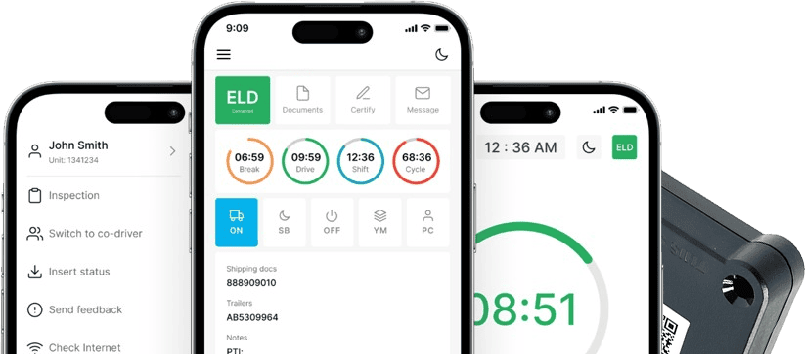
The driver-facing application is where usability either helps or hurts daily compliance. Features worth evaluating include clear duty-status controls, visibility into available hours remaining, straightforward log review, a simple certification process, an easy way to add annotations, accessible inspection mode, malfunction alerts, offline operation for areas with poor connectivity, driver notifications for upcoming limits, secure authentication, and overall simple navigation.
LogSafe US’s confirmed features in this category include a driver mobile application with electronic Hours of Service recording, compliance reports, and log review and correction tools. Any feature not listed on the current LogSafe US website should not be assumed to be included, regardless of what similar providers offer.
Importance of Reliable Customer Support
Support quality matters most in moments that can’t wait: during initial setup, driver training, connection problems, an ELD malfunction, a roadside inspection, log corrections, account changes, adding a new vehicle to the fleet, or a DOT audit. A device that works fine day to day but leaves a driver stuck during an inspection creates a real compliance risk.
When evaluating customer support as part of your buying decision, consider hours of availability, language options for a multilingual driver workforce, response channels, and whether support staff actually understand compliance requirements rather than just the hardware. LogSafe US provides confirmed 24/7 multilingual support in English, Russian, Uzbek, Arabic, and Spanish.
Pricing and Subscription Options to Consider
Total cost depends on more than the hardware price alone. Factors to account for include the hardware purchase itself, the monthly subscription rate, any required cables for your specific vehicles, shipping costs, activation fees, installation time and support, ongoing customer support, replacement hardware if a device fails, contract length, cancellation terms, and any additional fleet-management features bundled into the plan.
LogSafe US’s PT30 hardware bundle is listed at a specific price on the PT30 product page, while monthly subscription pricing depends on fleet size. If you’re comparing costs, request a current quote directly, since pricing based on fleet size is not something a general guide can accurately state for your specific operation.
ELD Buying Checklist for Trucking Companies
| Feature to Check | Why It Matters | Question to Ask the Provider |
| FMCSA registration | Confirms the device meets required technical standards | Is this exact model currently on FMCSA’s registered ELD list? |
| Revocation status | A revoked device is no longer considered compliant | Has this device ever been listed on FMCSA’s revoked ELD list? |
| Vehicle compatibility | Prevents connectivity gaps across mixed fleets | Which diagnostic ports and engine types does this support? |
| Required cables | Wrong cables delay installation and create data gaps | Which cable do I need for each specific truck in my fleet? |
| Driver usability | Poor interfaces increase duty-status errors | Can I test the driver app before committing? |
| Inspection tools | Speeds up roadside inspections | How does inspection mode display current and prior records? |
| Data transfer | Required for completing an electronic transfer request | Which telematic and local transfer methods are supported? |
| Log editing controls | Protects record integrity while allowing legitimate corrections | How are edits annotated and tracked in the system? |
| Reporting | Supports fleet-wide visibility and audit prep | What compliance reports come standard with the subscription? |
| Offline operation | Keeps recording accurate in low-connectivity areas | Does the device store data locally when there’s no signal? |
| Malfunction support | Reduces downtime and compliance risk | What’s the process and turnaround time if hardware fails? |
| Customer service | Matters most during inspections and malfunctions | What are your support hours and available languages? |
| Contract terms | Affects flexibility if your needs change | Is this month-to-month, or is there a required contract length? |
| Total cost | Avoids surprise expenses beyond the subscription | What’s included, and what costs extra? |
| Scalability | Affects ease of adding trucks and drivers later | How does pricing and setup change as my fleet grows? |
How LogSafe US Provides a Complete ELD Solution
Matching the buyer factors covered in this guide against what’s actually confirmed on LogSafe US’s current site, the PT30 hardware connects through J1939, J1708/J1587, or OBD-II diagnostic interfaces depending on the vehicle, and pairs with the driver application using Bluetooth Low Energy. That range of supported interfaces addresses much of the compatibility question raised earlier for fleets running mixed truck types.
The service includes electronic Hours of Service records, a driver mobile application, compliance reports, log review and correction tools, DOT audit assistance, and compliance consulting. Support runs 24/7 in English, Russian, Uzbek, Arabic, and Spanish, and the service is month-to-month with no long-term contract for owner-operators and fleets across the United States.
LogSafeUS isn’t presented here as the right fit for every fleet. Whether it matches your specific vehicles, driver count, and budget depends on the details covered throughout this guide. If you want to check compatibility for your trucks or get current pricing, you can view the PT30 ELD device, check the 9-pin cable or 16-pin cable for Volvo and Mack trucks for your specific connector type, or contact LogSafe US directly.
Frequently Asked Questions
What features should a good ELD system have?
Look for verified FMCSA registration, driver-friendly usability, confirmed vehicle compatibility, functional inspection tools, useful reporting, and dependable, responsive customer support.
Why is FMCSA certification important for ELD devices?
Providers self-certify that a device meets technical standards and register it with FMCSA. This is not the same as independent government testing or endorsement.
Can drivers edit incorrect logs on an ELD?
Yes, within limits. Drivers can correct errors and add annotations, but the original record stays visible and automatically recorded driving time cannot be improperly deleted.
How much does an ELD system cost?
Total cost depends on hardware price, monthly subscription fees, required cables, fleet size, and contract terms, so costs vary meaningfully between providers and fleets.
What should trucking companies consider before buying an ELD?
Consider FMCSA registration, vehicle compatibility, driver usability, inspection features, customer support quality, pricing structure, and how well the system fits your specific fleet.