
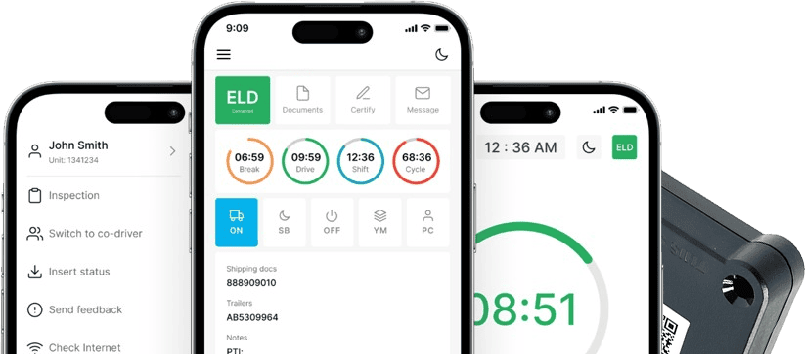

Electronic Logging Devices (ELDs): Complete Guide for Truck Drivers and Fleet Compliance
If you drive a commercial motor vehicle or manage a fleet, chances are you already interact with an electronic logging device every shift, even if you have never stopped to think about how it actually works. This guide walks through what an ELD records, why the federal government requires one for most commercial drivers, how the hardware connects to your truck, and what to look for when you are choosing a system for yourself or your fleet.
This article is intended as an educational resource, not legal advice. Regulations can change, and specific situations vary, so always confirm current requirements directly with FMCSA or a qualified compliance professional.
What Is an Electronic Logging Device (ELD)?
An electronic logging device is hardware, paired with software, that automatically records a commercial driver’s driving time by connecting to the vehicle’s engine. Once installed, it captures engine hours, vehicle motion, miles driven, and location data, then uses that information to build an accurate record of duty status.
This is different from a simple GPS tracker, which only reports location and movement without recording hours of service or duty status changes. It is also different from an electronic logbook system that runs purely as a smartphone app with no connection to the vehicle’s engine. Because a true ELD pulls data straight from the engine control module, it cannot be manually adjusted the way an app-only logbook can, which is the core reason FMCSA built the mandate around engine synchronization rather than software alone.
At a minimum, an ELD needs to record:
- Engine power status (on, off, or in a data diagnostic event)
- Vehicle motion status
- Miles driven
- Engine hours
- Date, time, and location at required intervals
- Driver identification and duty status
Why Are ELD Systems Required for Commercial Trucks?
The requirement traces back to the 2012 MAP-21 highway funding law, which directed FMCSA to mandate electronic recording of Hours of Service (HOS) for drivers who are already required to keep records of duty status. The goal was straightforward: reduce fatigued driving, cut down on falsified paper logs, and make HOS records easier for both drivers and safety officials to verify.
That does not mean every commercial vehicle on the road needs one. The rule is tied to whether a driver is already required to prepare records of duty status (RODS) under Hours of Service rules. Drivers who qualify for a recognized exception, covered in the next section, are not required to run an ELD simply because they operate a commercial vehicle.
ELD compliance exists to support three practical goals for a carrier: accurate HOS records, fewer disputes during roadside checks, and a documented history that can be produced quickly if a safety official or auditor asks for it.
Understanding the FMCSA ELD Mandate and Compliance Requirements
The Electronic Logging Devices and Hours of Service Supporting Documents rule was published by FMCSA in December 2015, with mandatory use taking full effect on December 16, 2019. Under the rule, most drivers who are required to keep RODS must use a self-certified, FMCSA-registered ELD.
Who generally needs one. Interstate drivers of property-carrying and passenger-carrying commercial motor vehicles who must keep RODS more than 8 days in any 30-day period fall under the mandate.
Major recognized exceptions include:
- Short-haul drivers operating under the 395.1(e) exception, who stay within a 150 air-mile radius of their normal work reporting location, return to that location each day, and stay within the applicable duty-period limit
- Drivers who keep paper RODS no more than 8 days within any 30-day period
- Driveaway-towaway operations, where the vehicle being driven is the commodity being delivered
- Drivers operating vehicles with an engine model year older than 2000
What “FMCSA certified ELD” actually means. You will see the phrase FMCSA certified ELD used often in searches, but it is worth understanding precisely what that means. FMCSA does not test, inspect, or independently certify individual devices before they reach the market. Instead, ELD manufacturers self-certify that their device meets the technical specifications in 49 CFR Part 395, Subpart B, and then register that device on FMCSA’s public list of registered ELDs. Carriers and drivers are expected to use only devices that appear on that list, since FMCSA can remove noncompliant devices from it.
Carrier responsibilities include registering only devices from FMCSA’s list, training drivers on the specific unit in use, retaining supporting documents, and managing malfunction reporting. Driver responsibilities include accurately selecting duty status, annotating edits, certifying logs at the end of each 24-hour period, and carrying required backup materials during a transition or malfunction.
How Does an ELD Device Work in a Commercial Vehicle?
The process is more mechanical than most drivers realize:
- Connection at the diagnostic port. The ELD hardware plugs into the vehicle’s diagnostic connector, commonly a J1939, J1708/J1587, or OBD-II interface depending on the truck’s age and engine type.
- Data capture from the engine. The device reads engine power status, vehicle motion, and mileage directly from the engine control module.
- Transmission to the driver’s application. Using a wireless connection such as Bluetooth Low Energy, the hardware sends that data to a mobile app or in-cab display where the driver selects duty status and reviews entries.
- Building the duty-status record. The app compiles driving time, on-duty time, and off-duty time into a record of duty status that the driver certifies at the end of each shift.
- Reporting to the carrier dashboard. The completed logs sync to a back-office system fleet managers and safety staff can review for HOS compliance and reporting.
Important Features Every ELD System Should Have
Some capabilities are required by the technical standards in 49 CFR Part 395, while others are optional conveniences that vary by provider.
Mandatory or regulation-driven capabilities:
- Automatic recording of driving time from engine data
- Standardized duty-status categories drivers can select
- Driver certification of daily records
- Data transfer to safety officials by at least one telematic method (web services or email) and one local method (USB or Bluetooth)
- Malfunction and data diagnostic event indicators
- Unidentified driving time capture when no driver is logged in
Optional fleet-management features that support compliance without being required by the rule:
- Mobile application access for drivers
- Compliance reporting dashboards for fleet managers
- Flexible log correction tools that route edits through proper annotation
- GPS-based location and route data
- Vehicle diagnostic and fault code visibility
How ELD Devices Help Drivers Maintain Accurate Logs
An electronic logging device automatically captures driving time the moment the vehicle is in motion, which removes the guesswork that came with filling out a paper logbook at the end of a shift. Duty-status changes, such as switching from driving to on-duty-not-driving, still require driver input, since the device cannot know why the truck stopped or what the driver is doing off the road.
When something needs correcting, drivers can request an edit, but every edit must include an annotation explaining the reason, and the original record is retained alongside the correction rather than erased. If the vehicle moves without anyone logged in, the system records that time as unidentified driving, which the responsible driver must later claim and annotate.
At the end of each 24-hour period, the driver reviews the full truck driver log system entry and certifies it as accurate. That certification step matters because responsibility for correct entries stays with the driver. An ELD reduces certain types of errors, but it does not review context, catch every mistake, or replace the driver’s own judgment about whether a log accurately reflects the day.
Benefits of Using ELD Systems for Trucking Companies
For fleet managers and safety teams, the practical upside of a properly used ELD program includes:
- Compliance visibility across every truck and driver from a single dashboard, rather than collecting paper logs after the fact
- Reduced paperwork since HOS data is captured and stored electronically instead of manually transcribed
- Faster reporting for internal audits, insurance reviews, or safety meetings
- Driver support through standardized duty-status entry, which can reduce disputes over recorded hours
- Inspection preparation, since records are already organized and ready to transfer when a driver is stopped
None of this guarantees a violation-free record or immunity from enforcement action. A carrier that adopts an ELD program still needs sound training, accurate duty-status habits, and attentive oversight for the system to actually reduce compliance risk.
ELD vs Paper Logs: Understanding the Difference
| Factor | Electronic Logging Device | Paper Logs |
| Recording method | Automatically synced with the engine | Manually written by the driver |
| Driving-time capture | Captured in real time from vehicle motion | Estimated and recorded after the fact |
| Editing | Requires an annotated edit; original entry retained | Can be crossed out or rewritten freely |
| Error risk | Lower for driving time; still relies on correct duty-status selection | Higher, due to manual entry and memory gaps |
| Inspection process | Displayed on device or transferred electronically to the officer | Physically handed to the officer for review |
| Storage and retrieval | Stored digitally, generally for the current period plus prior records as required | Stored as physical paper copies |
| Eligibility or permitted use | Required for most drivers who must keep RODS beyond 8 days in 30 | Permitted only for drivers who qualify for a recognized exception |
Common ELD Compliance Mistakes Drivers Should Avoid
- Selecting the wrong duty status, such as marking on-duty time as off-duty during a fuel stop or inspection
- Failing to certify logs at the end of the 24-hour period, which leaves the record incomplete
- Ignoring unidentified driving time instead of reviewing and claiming segments that belong to them
- Making edits without annotations, which can make a correction look like an unexplained change
- Missing required annotations for location, malfunction periods, or manual duty-status entries
- Poor malfunction documentation, including failing to note when a malfunction occurred or when it was reported to the carrier
- Not carrying backup materials, such as paper logs for the current 24-hour period and the previous 7 days, during a malfunction or before a replacement device is issued
How ELD Devices Help During DOT Inspections
During a roadside inspection, the driver typically places the device in inspection mode, which displays the current and prior 7 days of RODS data directly on the screen for the officer to review. If the officer requests it, the driver can transfer the data electronically using one of the device’s supported methods, generally a telematic option like web services or email, or a local option like USB or Bluetooth.
Drivers should also carry required supporting documents, such as bills of lading, dispatch records, or fuel receipts, since these can be requested alongside HOS data. Before presenting records, it helps to confirm the device is functioning normally, that recent duty-status entries are certified, and that any pending edits or unidentified driving segments have been resolved rather than left open.
Choosing the Right ELD Solution for Your Fleet
A practical evaluation checklist should cover:
- FMCSA registration status — confirm the specific model appears on FMCSA’s current list of self-certified, registered ELDs
- Vehicle and diagnostic-port compatibility — check whether the device supports J1939, J1708/J1587, or OBD-II depending on your fleet’s engine types
- Ease of installation — a straightforward connection at the diagnostic port reduces downtime
- Driver usability — a clear app interface with straightforward duty-status selection reduces log errors
- Support availability — responsive assistance matters most during a malfunction or an active roadside inspection
- Inspection features — confirm the device supports both telematic and local data transfer
- Reporting — dashboards that give fleet managers visibility without manual data entry
- Malfunction support — a clear process for reporting issues and receiving a replacement within the required timeframe
- Contract terms — month-to-month flexibility versus long-term commitments
- Fleet size — some providers price differently for owner-operators versus larger fleets
- Total cost — hardware, subscription, and any cables or accessories needed for your specific trucks
How LogSafe US Helps Truck Drivers Stay Compliant
Several of the problems covered in this guide, from diagnostic-port compatibility to malfunction support and log corrections, are areas where the hardware and service you choose actually matter.
LogSafe US supplies the PT30 ELD device, which connects through J1939, J1708/J1587, or OBD-II diagnostic interfaces depending on the vehicle, using Bluetooth Low Energy to link with the driver application. Depending on your truck’s connector type, LogSafe US also carries compatible cables, including a 9-pin cable, a 16-pin cable for Volvo and Mack trucks, and a 16-pin OBD-II cable for light and medium duty vehicles.
Beyond the hardware, LogSafeUS offers electronic Hours of Service recording, a mobile application with compliance reports, flexible log corrections, DOT audit support, compliance consulting, and safety management and reporting. Service runs month-to-month with no long-term contract, and support is available 24/7 in English, Russian, Uzbek, Arabic, and Spanish for owner-operators and fleets across the United States.
If you are ready to see how the PT30 fits your trucks, you can view the PT30 ELD device or contact LogSafe US to talk through your fleet’s setup.
Frequently Asked Questions
What is an electronic logging device (ELD)?
An ELD is hardware that connects to a commercial vehicle’s engine to automatically record driving time, engine hours, and location for Hours of Service compliance.
Why do truck drivers need an ELD system?
Most drivers required to keep records of duty status need one because FMCSA’s mandate replaced paper logs with automated recording to reduce fatigue-related crashes and falsified records.
Are all commercial vehicles required to use an ELD?
No. Drivers who qualify for recognized exceptions, such as the short-haul exemption or pre-2000 engine models, are not required to use one.
How does an ELD help with DOT compliance?
It automatically captures driving time, organizes duty-status records, and allows electronic data transfer during inspections, though drivers remain responsible for accurate entries.
What features should I look for in an ELD device?
Confirm FMCSA registration, diagnostic-port compatibility, reliable data transfer methods, driver-friendly software, and responsive support for malfunctions or edits.