

Hours of Service Rules Explained: How ELDs Help Drivers Stay Compliant
A missed break, a duty status logged the wrong way, or a driving window pushed past its limit can turn a routine trip into a violation. Understanding hours of service rules is not just about memorizing numbers. It means knowing how those numbers apply to your specific type of operation, what counts as driving versus on-duty time, and where an electronic logging device fits into keeping an accurate record. This guide breaks down the current requirements, common mistakes, and how digital tracking supports the process without replacing driver judgment.
This article is intended for general education. It is not legal advice, and specific compliance situations should be confirmed with FMCSA or a qualified compliance professional.
What Are Hours of Service (HOS) Regulations?
HOS regulations are federal rules, established by the Federal Motor Carrier Safety Administration under 49 CFR Part 395, that limit how long a commercial driver can drive and work before taking required rest. They exist because fatigue is a measurable factor in commercial vehicle crashes, and the rules are built around giving drivers predictable recovery periods.
Drivers required to follow these rules must maintain a record of duty status, commonly called RODS, documenting driving time, on-duty time, off-duty time, and, where applicable, sleeper-berth time for each day. Carriers are responsible for making sure drivers understand the applicable limits and for retaining those records. Drivers are responsible for selecting the correct status throughout the day and certifying that the record is accurate.
The specific limits are not identical for everyone. Property-carrying drivers, who haul freight, follow one set of numbers. Passenger-carrying drivers, who operate buses or motorcoaches, follow a different set. Certain specialized operations, such as short-haul routes or agricultural transport, have their own qualifying exceptions. Applying property-carrying limits to a passenger-carrying operation, or the reverse, produces an inaccurate compliance picture.
Why HOS Rules Are Important for Driver Safety
The connection between hours behind the wheel and crash risk is well established, which is why the rules focus on two things at once: how long a driver can operate without a break, and how much recovery time has to happen before the next shift starts.
Fatigue management is not solely the driver’s responsibility. Dispatch scheduling, load planning, and detention time at shippers or receivers all affect how much of a driver’s available window gets used productively versus wasted waiting. A driver who is compliant on paper can still be pushed toward fatigue if a carrier repeatedly schedules pickups that eat into rest periods. The rules set the outer limits, but the day-to-day scheduling decisions made by drivers, dispatchers, and carriers together determine whether those limits actually protect against fatigue or just get treated as a target to hit every day.
Understanding Driving Time and Rest Break Requirements
The following limits apply to property-carrying commercial motor vehicles operating in interstate commerce. Passenger-carrying drivers follow a different structure, covered separately below.
- 11-hour driving limit. A driver may drive a maximum of 11 hours after 10 consecutive hours off duty.
- 14-hour driving window. All driving must be completed within 14 consecutive hours of coming on duty. This window runs on real time and does not pause for meal stops, fuel stops, or loading delays.
- 30-minute break. A break of at least 30 minutes is required after 8 cumulative hours of driving time. The break can be satisfied with off-duty time, sleeper-berth time, or on-duty, not-driving time.
- 10 consecutive hours off duty. This is the minimum recovery period required before the driving and duty windows reset.
- 60/70-hour limits. A driver cannot drive after accumulating 60 hours on duty in 7 consecutive days, or 70 hours in 8 consecutive days, depending on the carrier’s operating schedule.
- 34-hour restart. Taking 34 or more consecutive hours off duty resets the 60/70-hour weekly calculation, allowing the driver to start a new cycle.
- Sleeper-berth provision. Drivers may split the required 10 hours off duty using an 8/2 or 7/3 combination, with the longer period spent in the sleeper berth.
- Adverse driving conditions exception. When unexpected conditions such as severe weather or unusual traffic delay a trip, a driver may extend the driving limit and the driving window by up to 2 hours, provided the condition could not have been known before dispatch.
- Short-haul exception. Drivers who stay within a 150 air-mile radius of their normal work reporting location, return there the same day, and stay within the applicable duty-period limit may qualify for relief from the standard RODS requirement.
Passenger-carrying drivers, including bus and motorcoach operators, follow a separate structure: a 10-hour driving limit after 8 consecutive hours off duty, and a 15-hour on-duty limit that, unlike the 14-hour window for property-carrying drivers, does not include off-duty time. Passenger-carrying drivers are also not subject to the 30-minute break requirement, and they cannot use the 34-hour restart provision.
| Rule | General Requirement | Practical Meaning | Important Qualification |
| Driving limit (property) | Max 11 hours driving after 10 hours off duty | Sets the ceiling on actual time spent driving | Resets only after a full qualifying off-duty period |
| Driving window (property) | Must finish driving within 14 hours of coming on duty | Non-driving tasks eat into the same window | Does not pause for breaks, delays, or detention |
| 30-minute break | Required after 8 cumulative driving hours | Can be off-duty, sleeper berth, or on-duty not driving | Does not apply to passenger-carrying drivers |
| Off-duty requirement | 10 consecutive hours off duty | Minimum recovery period before the next shift | Can be split using the sleeper-berth provision |
| Weekly limit | 60 hrs/7 days or 70 hrs/8 days | Caps cumulative on-duty time across the week | Depends on carrier’s chosen operating schedule |
| 34-hour restart | 34+ consecutive hours off duty | Resets the weekly on-duty calculation | Only available to property-carrying drivers |
| Sleeper-berth split | 8/2 or 7/3 combination | Allows dividing rest into two periods | Longer block must be spent in the berth |
| Adverse driving conditions | Up to 2 extra hours | Allows finishing a delayed trip safely | Condition must be unforeseeable at dispatch time |
| Short-haul exception | Stay within 150 air-mile radius, return same day | Reduces RODS burden for local routes | Exceeding the radius or time limit voids it for that day |
| Passenger-carrying driving limit | Max 10 hours driving after 8 hours off duty | Different structure from property-carrying rules | 15-hour window excludes off-duty time |
Common Hours of Service Violations
Driving beyond an available limit. This happens when a driver miscalculates remaining hours, often after a delay eats into the window unexpectedly. Checking available time before starting a trip segment helps prevent it.
Continuing after the 14-hour window. Because this window does not pause for stops, a driver who assumes it works like the 11-hour driving limit can end up driving legally on paper for the 11-hour count while actually violating the 14-hour window.
Missing a required break. Skipping the 30-minute break after 8 hours of driving is a frequent finding, usually from underestimating cumulative driving time across a shift with multiple stops.
Incorrect duty-status selection. Marking on-duty time as off-duty, particularly during loading, unloading, or a fuel stop, misrepresents the actual workday.
Failing to log in. Driving without being logged into the ELD creates a gap in the record that has to be resolved after the fact.
Unidentified driving time. When the vehicle moves without a driver logged in, the system attributes that segment to no one until someone claims and annotates it.
Missing log certification. A record left uncertified at the end of the 24-hour period is treated as incomplete, regardless of how accurate the individual entries are.
Unsupported edits. Every correction needs an annotation. An edit made without an explanation raises questions about the accuracy of the original entry.
Misuse of personal conveyance. This status is meant for specific circumstances defined by FMCSA guidance and carrier policy, not as a general way to avoid logging driving time.
Improper yard-move status. Similar to personal conveyance, this status has defined criteria, and applying it outside those criteria misrepresents actual duty status.
Form-and-manner errors. Missing required information, such as a shipping document number or a duty-status annotation, can make an otherwise accurate log noncompliant on a technicality.
Failing to follow ELD malfunction procedures. When a device malfunctions, the driver must reconstruct records for the current 24-hour period and previous 7 days if that data isn’t already retained, and notify the motor carrier within 24 hours.
How ELD Devices Track Driver Working Hours
- The device connects to the vehicle’s diagnostic system through a J1939, J1708/J1587, or OBD-II interface, depending on the truck.
- It captures engine power status, vehicle motion, time, and mileage directly from the engine.
- The driver selects or confirms non-driving duty statuses, such as on-duty-not-driving, off-duty, or sleeper berth, since the device cannot determine the reason for a stop on its own.
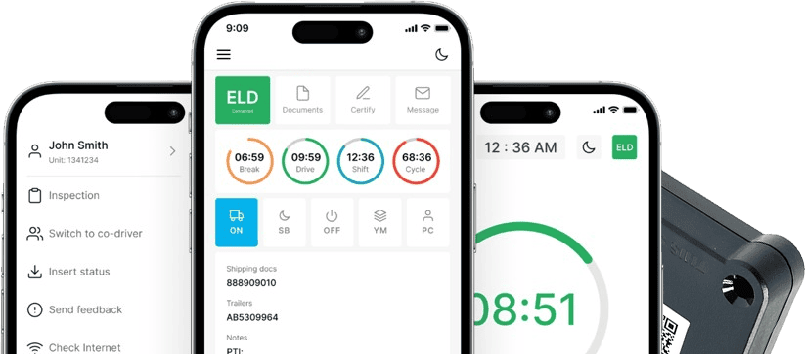
- Records appear in the driver’s mobile application and sync to the carrier’s system for review.
- The driver reviews the day’s entries, adds any needed annotations, and certifies the record at the end of the 24-hour period.
Driving time and engine data are captured automatically. Everything else, including why the truck is stopped, whether an edit is justified, and whether the day’s record is accurate, still depends on the driver.
Managing Driver Logs Through Electronic Systems
Reviewing daily logs before certifying them catches errors while they are still easy to fix. Corrections require an annotation explaining the change, and the original entry stays visible alongside the correction rather than being erased.
Unidentified driving records need to be reviewed and claimed by the responsible driver, since an unresolved segment leaves a gap in the day’s account. If a carrier suggests an edit, that suggestion has to go through the driver, who reviews and either accepts or rejects it with an explanation. Carriers cannot silently alter a driver’s certified log; any change to a certified record has to be visible and attributed.
Protecting login credentials matters because shared or careless logins create unassigned driving time that someone else has to sort out later. Supporting documents, such as bills of lading or fuel receipts, should be kept alongside the electronic record since they may be requested together. If the device malfunctions, following the documented notification and paper-log procedure keeps the record intact until the issue is resolved.
How Fleet Managers Monitor HOS Compliance
Fleet managers use electronic systems to review how much driving time each driver has left before hitting a limit, which helps with scheduling before a problem develops rather than after. Recurring issues, like a driver consistently running close to the 14-hour window, are easier to spot across a fleet dashboard than through individual paper logs.
Unidentified driving events and unassigned records need regular review, since they accumulate quietly if no one is checking. Compliance reports built from the same data support driver coaching conversations and help managers maintain the records a carrier is required to keep.
None of this transfers responsibility away from the driver. A manager can flag a pattern and support better habits, but the driver is still the one selecting duty status and certifying the record each day.
Reducing Violations With Automated Tracking
Automatic driving-time capture removes the manual guesswork that led to many paper-log errors, and dashboard alerts can flag when a driver is approaching a limit before it becomes a problem. This reduces the administrative burden of tracking hours by hand and gives both drivers and managers earlier visibility into risk.
It does not guarantee a violation-free record. A driver who ignores an alert, misclassifies a duty status, or skips certification can still generate a violation regardless of how good the underlying tracking technology is. Automated tracking narrows the margin for error. It does not close it entirely.
Preparing Accurate Records for DOT Inspections
- Correct driver login so no time is recorded as unidentified
- Current duty status that reflects what the driver is actually doing at the moment of inspection
- Certified logs with no outstanding certification gaps
- Required previous-day records, generally the current and prior 7 days, available for review
- Supporting documents carried and organized for the trip
- Instruction materials for the specific ELD model kept in the cab
- Data-transfer procedures the driver is comfortable performing on request
- Inspection display mode accessible without delay
- Malfunction instructions covering notification steps and documentation requirements
- Blank paper logs available as backup during a malfunction or device transition
- Clear annotations for any special statuses, such as personal conveyance or adverse driving conditions
Benefits of Digital Hours Tracking Solutions
- Automatic driving-time capture pulled directly from engine data instead of manual estimation
- Reduced manual entry compared to handwritten paper logs
- Faster log review through a standardized digital format
- Better visibility into available hours before a limit is reached
- Easier retrieval of records when a specific day needs to be pulled up
- More organized inspection preparation through built-in display and transfer features
- Fleet-level reporting that consolidates data across every driver
- Identification of recurring log issues before they turn into repeated violations
- Support for driver coaching using concrete, dated examples
Digital tracking organizes and surfaces information more efficiently than paper. It does not eliminate the need for accurate duty-status selection or replace a driver’s responsibility for the final certified record.
How LogSafe US Helps Drivers Manage HOS Compliance
The mechanics covered in this guide, from diagnostic-port connections to malfunction handling and log review, are where the specific hardware and service a driver or fleet uses actually matters.
LogSafe US supplies the PT30 ELD hardware, which connects through a single link to the vehicle’s diagnostic port using J1939, J1708/J1587, or OBD-II interfaces, and pairs with the driver application over Bluetooth Low Energy. For fleets running different connector types, LogSafe US also carries a 9-pin cable, a 16-pin cable for Volvo and Mack trucks, and a 16-pin OBD-II cable for light and medium duty vehicles.
The service includes electronic Hours of Service logs, a driver application, compliance reporting, log review and correction tools, DOT audit assistance, and compliance consulting. Support is available 24/7 in English, Russian, Uzbek, Arabic, and Spanish, and the service runs month-to-month with no long-term contract for owner-operators and fleets across the United States.
If you want to see how the PT30 fits your operation, you can view the PT30 ELD solution or contact LogSafe US to talk through your fleet’s specific hours-tracking needs.
Frequently Asked Questions
What are hours of service rules for truck drivers?
They are federal driving and rest limits under 49 CFR Part 395, with specific requirements that depend on whether the driver operates a property-carrying or passenger-carrying vehicle.
How does an ELD track driving hours?
It connects to the vehicle’s engine to automatically capture driving time, vehicle motion, and mileage, while the driver confirms other duty statuses manually.
What happens if a driver violates HOS rules?
Consequences vary based on the specific violation and circumstances, and can include citations, out-of-service orders, or further review by safety officials.
Can ELDs prevent hours of service violations?
No. ELDs record data and can alert drivers approaching a limit, but they cannot replace correct duty-status selection or compliant scheduling decisions.
Why are HOS regulations important?
They limit driving time to manage fatigue, support driver alertness, and encourage responsible scheduling across drivers, dispatchers, and motor carriers.